For shared bookshelves

Spines in place,
stories in mind.

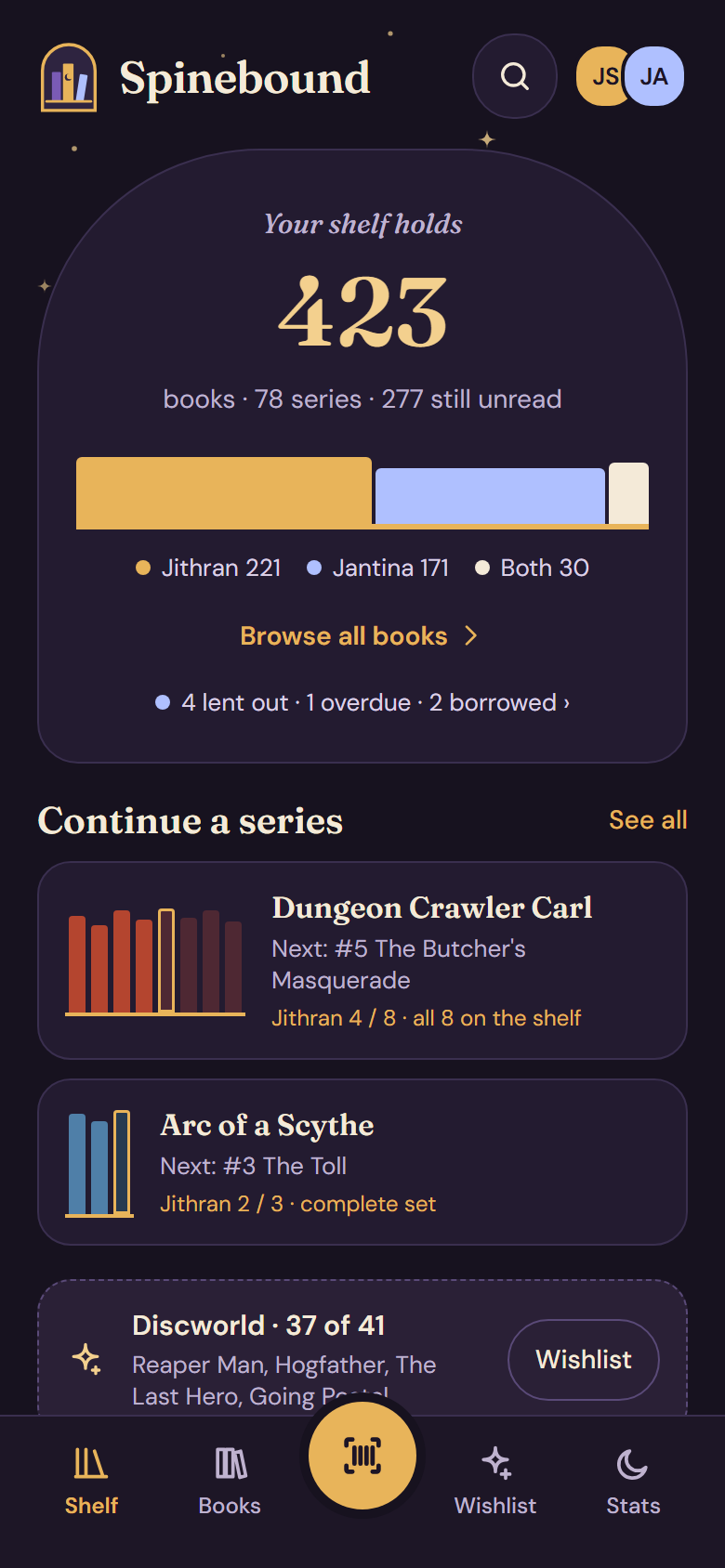
A shared physical bookshelf for a household. Scan the books you own together, see who owns which copy, and keep your own reading status.

Download for Android
  • Version 0.2.8
  • 10 Nov 2026
  • 17.2 MB
  • Android 8+
Latest release · signed APK How to install · What’s new

Changelog

What’s new

Version 0.2.8

Latest10 Nov 2026

Never stuck on a crashing app (update check first, safe mode, server minimum client version); buttons never clip their label; original titles for translated editions.

  • BetterA translated edition now shows the book's original title under its own ("De dans van de krijger · The Holy Road" in the series list), and a book that came without an author gets Hardcover's. New books get both when you add them; for the ones you have, open the book or use Settings → Hardcover → Refresh from Hardcover. Titles and authors you typed are never overwritten. SB-121
  • BetterSpinebound checks for an update before it syncs, so a version that can't handle the shared library's newer data still hears of its update, even when syncing fails. SB-119
  • BetterIf Spinebound crashed on the last two starts, it opens a safe screen instead: "Update now" (also without a connection, from the last update info it saw) or "Try syncing again". Automatic syncing waits meanwhile; your books are never deleted. SB-119
  • BetterWhen the server needs a newer app, Spinebound says "Update required" with an Update now button instead of syncing data it can't handle. SB-119
  • FixedButton labels are no longer cut off on phones with a larger font or a narrow screen: buttons grow with their label, and a row of buttons that does not fit moves the next button to a second line (for instance "Mark as bought" on the Wishlist). SB-120
Version 0.2.710 Nov 2026
  • FixedHardcover reading sync now finds books whose Hardcover author is spelled without a space ("GradyHendrix"), such as Horrorstör. SB-118
Version 0.2.610 Nov 2026
  • NewSettings → Hardcover has a Connect Hardcover button: you sign in on hardcover.app instead of pasting a token, and the app renews the sign-in by itself. Disconnect signs out and tells Hardcover to drop the access. Pasted personal tokens keep working, now under "Advanced: paste a personal token". The button appears once the app is built with Hardcover's client id. SB-26
  • NewYour reading status can follow Hardcover. Once Hardcover is connected, Spinebound picks up your status, start and finish dates and rating for the books in your library, on app start (at most every 6 hours), when you pull down to refresh, and with Sync now in Settings → Connections. A read in another edition counts too. Only your own reading is updated, never another reader's, and nothing is written to Hardcover. Settings shows the last sync, how many books matched and how many aren't in your library; books you don't have are only counted. Signed in before this version? Disconnect and connect Hardcover once to allow reading your library. SB-116
  • BetterThe website tagline is now "Spines in place, stories in mind." SB-117
Version 0.2.510 Nov 2026
  • BetterScanning a box set (Single or Bulk scan) no longer adds it as one book: the scanner opens the Add screen, which says "This is a box set with N books" and offers to add them as separate books in their series. In Bulk scan this pauses for one tap; going back returns to scanning. SB-115
  • FixedSplitting a box set whose entry carried the title or ISBN of its first book no longer loses that book and leaves a blank screen: every book of the box stays in your library. A book that is gone now says so, and if the Books list can't be read it shows an error with Try again instead of an empty screen. SB-113
  • FixedSaving a series on a book (More actions > Series) no longer closes the app. SB-114
  • NewThe scanner has two modes, Bulk scan (the default, remembered on this phone) and Single scan. In Bulk scan every new barcode is added to the shelf at once with the owners and format chosen on the panel, with a short buzz, and shows in the scanned list with Undo; tap a book there to open it. A book you already have shows a short notice (tap to open it), and the same barcode held in view is added once. Single scan works as before. SB-111
  • FixedAdding a book to the wishlist from the Add screen now keeps the chosen format. SB-111
  • BetterScanning a barcode now lets you pick the format (paperback, ebook, audiobook…) next to the owners, and remembers it for the rest of the scan session, so a stack of ebooks needs one tap. Only shown when formats are enabled. SB-110
Version 0.2.410 Nov 2026
  • FixedThe app no longer crashes on start when two phones had linked their own copy of the same series to Hardcover. The two series now merge into one on every phone, keeping the books and details of both; a sync error shows in Settings instead of closing the app. SB-109
  • NewEbooks and audiobooks wear a small badge on their cover, bottom-right: headphones (moonlight) for an audiobook, a tablet (starlight) for an ebook. It shows in Books (covers and list), search, the wishlist and on the book itself; paper books get none. SB-108
  • NewA long shelf on the bookcase shows a position track and Open, which lays the whole shelf out on stacked planks with a chip per series to jump to it. A book on a shelf shows a small plank with its neighbours, itself outlined, and Show on bookcase takes you to it there. SB-104
  • NewGroup books into a box set. When separate books really came in one box, select them in Books → Organise → Group as box set… (the title comes from their series, the box ISBN is optional), or open a book and choose ⋯ → Add to box… to put it in a box you have or a new one. Ebooks, audiobooks and borrowed books are left out. SB-104
  • BetterRestoring a backup on the server (server admin or household /admin) now really rolls every phone back to that backup. Changes a phone hadn't synced yet are still kept, but rows changed or books added after the backup disappear from the phones too, instead of staying on the phones that had them. Older app versions keep the old behaviour. SB-107
  • FixedThe web admin shows its separators and the "Waiting for your phone…" line correctly again, instead of "·" and "…". SB-106
  • NewBookcase. The Shelf tab can show every shelf as a plank of spines (Overview | Bookcase, remembered per phone; Bookcase is the default once you have shelves). Spines take their series colour, width from the page count and a tick when you have read the book; a box set stands in a slipcase with its title, its books at one height (also on the series shelf). Tap a spine to open the book; hold it to drag it to another shelf or another place, which gives that shelf a manual order with Reset (Undo right after). Not on a shelf comes last with Sort into shelves. Edit shelves has an Order choice (Automatic / Manual), Move to shelf shows how many books each shelf holds and where yours land, and a book shows its place ("7th from the left"). SB-104
  • NewShelves can keep their own order. A copy remembers its place on a manually ordered shelf (synced to every phone once the server supports it); a shelf without one keeps the automatic order (series and number, then author and title). Claude's move_to_shelf takes a position. SB-104
  • NewFind cover looks in more places and finds more. Besides Open Library and Google Books it now asks Apple Books, Hardcover (when connected), a Goodreads cover service and, once a key is set up for it, Google Images, all at the same time; each tile shows its source and size, the cover you have now is marked "Current", and a source that failed says why, with Retry. Fixed: titles with a series or subtitle ("Neuromancer (Sprawl, #1)", "De avonden: Een winterverhaal") found nothing on Open Library; they are now searched by their plain title. SB-105
  • NewThe household's owner can back up and restore the shared library in the household web admin (/admin → Backups). "Download backup" saves the same zip as Settings → Backup in the app, with a checksum, so it also restores on a phone; a backup from a phone in the household restores on the server too. A restore checks the file (damaged, newer or another household's backups are refused), shows what it holds, asks you to type its name, keeps a backup of the library from before, and the phones load the restored library on their next sync. The server keeps the newest 10; members don't see any of it, and it is in the security log. SB-103
  • NewSeries know your formats. The shelf still decides "Complete set"; a volume you only have as an ebook or audiobook stands on the series shelf as an outlined spine (starlight for ebooks, moonlight for audiobooks), and a paper volume you also own digitally gets a cap in that colour. A series shows "On shelf 2/3" next to "Owned in any format 3/3" (or "Audiobook 7/7" when that format is whole), with the badge "Complete as audiobook", "Complete as ebook" or "Complete across formats". Digital volumes count as owned, so they are not in "Missing books"; the new filter "Complete in any format" finds series that are whole once you count every format. Claude's series tools report on_shelf, ebooks, audiobooks and complete as well. SB-96
  • NewHome counts every format. The big number counts each title once over the formats you choose, with a chip per format (383 physical · 21 ebooks · 8 audio) once you own something digital; tap a chip to see those books. Settings → Home → Count on home picks which formats add up and whether a title in two formats counts once, with a live preview. It is stored on this phone only. When only paper is counted, home reads "Your bookcase holds … physical books". Books has a Format filter too. SB-96
  • SB-101: preserve box sets as synced containers around their volume copies; add box management APIs and MCP tools.
  • NewBox sets stay a box. Splitting a box set now keeps the box (switch "Keep the box", on by default) and links the volumes you already own instead of adding them twice. The box's spines stand in a slipcase frame on the series shelf, its books sit in one frame in Books (list view), the book shows "Part of box set", and the box view lets you remove a book from the box, add one, move the whole box to another shelf, or dissolve it (the books stay). Each book still counts on its own. In a shared library this appears once the server supports box sets. SB-101
  • NewThe server copies every nightly backup (and each backup made by hand) to your own Nextcloud (encrypted too when a BACKUP_ENCRYPTION_KEY is set), checks the copy by reading it back, keeps 14 daily and 8 weekly copies there, and shows "Last off-site copy: … OK / failed" on the server admin page; a failure is also in the security log and never stops the server. SB-74
  • NewChoose a book's format when you add it (paperback, hardcover, ebook or audiobook, with the platform for digital ones), and change it later on the book (⋯ → Format…, or Format under Your copy). Ebooks and audiobooks stay off the shelf and have no Lend button. In a shared library this appears once the server supports formats. SB-96
  • NewClaude knows formats too: search by format (physical, digital, or one format), add a book or a copy as an ebook or audiobook with its platform, change a copy's format with edit_copy, record whether a read was listened to, and wish for a specific format. Lending an ebook or audiobook is refused, and stats split reads into read and listened. SB-96
  • NewFix a series' total. On a series (Books → Series → the series) tap Set/Edit total volumes; leave it empty when unknown. Claude can do the same with series_edit (asks first when the total would be below a volume you own), and it shows in Recent activity. SB-102
  • NewEvery copy now has a format: paperback, hardcover, ebook or audiobook. The books you already have become paperbacks, or hardcovers where the book says so. Ebooks and audiobooks never stand on a shelf and can't be lent; a read can record whether you read or listened, and a wish which format you want. The server must be updated first; phones only use formats once it supports them. SB-96
  • FixedIn Books → Series the filter chips (All, In progress, …) are no longer covered by the first series card; the list now starts below them. SB-100
  • NewHand over ownership. The owner can make another phone the owner from the web admin (Devices → Make owner…, type the phone's name); you become a member. If the owner's phone is lost, the server admin (/admin/server → Households) removes it and sets a new owner, and `server households set-owner <household> <device> --confirm <household>` does the same from the command line. Every step is in the security log. In the app, Settings → Household → Transfer ownership… does the same. Claude can't change ownership. SB-99
  • NewFind cover. On a book (⋯ → Find cover…) or in Edit book, Spinebound searches Open Library (every edition) and Google Books for covers by title and author and shows them in a grid with their size. Tap one to use it; it is stored like your own photo and reaches the other phones in your library. SB-98
  • NewBox sets. Scanning a box set (one barcode, several books, like The Lord of the Rings in three paperbacks) offers to add the books separately, each at its number in the series with its own reading and rating. For a box set already in your library, use ⋯ → Split box set… on the book: its owners and shelf carry over, books you already have aren't added twice, and the box set entry goes. Claude can do the same with split_box_set. SB-95
  • FixedWrapped chips no longer touch: the Activity filters (readers and kinds) have a gap between rows and between the two groups, and every other chip, badge and button group in the app now uses the same spacing. SB-97
  • FixedA series with a book beyond its total (Harry Potter with The Cursed Child as #8) reads "7 of 7 · +1 extra" instead of 8 of 7. SB-93
  • FixedSeries count volumes, not copies: Rincewind shows "6 of 8" with #4 and #7 missing even if you own The Light Fantastic twice. Books without a volume number are listed as "unnumbered" and no longer count as missing volumes. Series whose books are all archived stay hidden. Claude's series tools use the same counts. SB-93
  • NewEverything Claude changes in your library now shows up in Recent activity, marked "via Claude": tags, notes, series, genres, shelves, collections, ratings and more, not only adding, lending and archiving. There is an "Edits" filter. SB-94
  • FixedThe web admin's Devices list shows which reader each phone is, like the app ("SM-S908B · Jithran", or "not set"). SB-92
  • FixedA phone that never chose its reader explicitly (the one the app already shows as "This phone is …") now tells the household who it is on its first sync, so the other phones and the admin see it too. SB-92
  • NewPull down on Books or the Shelf home to sync right away (in a shared library), and Spinebound syncs when you open the app again. If the server doesn't answer you see why: "took too long to answer" is no longer the same message as "no connection".
  • FixedWhen checking for updates or downloading an update fails (server down, no network, timeout), Spinebound now says so with a Retry button and the technical detail behind "Details", instead of staying silent.
Version 0.2.310 Nov 2026
  • NewSettings → Household shows who uses this phone ("This phone is Jithran") and lets you change it. Devices lists each phone with its reader, like "SM-S908B · Jithran".
  • NewAn invite can be for one reader: that person's phone joins as that reader straight away, without "Who are you?".
  • BetterJoining as "Someone new" with a name the household already has asks "Did you mean the existing Jantina?" first.
  • NewReaders: merge a duplicate reader into another (books, reading history, ratings, wishes and notes move over, on every phone), or delete a reader who has nothing of their own yet. In a shared library only its owner can merge or delete readers.
  • BetterTap the readers at the top of the home screen to open Readers. The "Manage readers" link is gone from the book screen (Readers stays in Settings).
  • NewSettings → Claude access (in a shared library): create read-only or read & write keys for Claude, copy the ready-made `claude mcp add` line, see when each key was last used and revoke it.
  • NewA household admin page at spinebound.jithran.nl/admin. Sign in by approving the code on a phone in your household (no password), then see your phones, Claude keys, web sessions, recent activity and a security log.
  • NewAdd Spinebound to claude.ai as a connector. Claude opens a Spinebound page where you choose read only or read & write and approve the code on your phone; no password and no key to copy. You can disconnect it under Claude access.
  • NewA server admin at spinebound.jithran.nl/admin/server for whoever runs the server: created once at /admin/setup with a code from the server's log, signs in with a password and optionally an authenticator code.
  • NewThe server admin makes, downloads, uploads and restores backups of the whole server. A restore is checked first, keeps a backup of what it replaces, and phones pick up the restored library by themselves.
Version 0.2.210 Nov 2026
  • BetterThe household server can now list and remove households from the server side, so leftovers from testing can be cleaned up.
Version 0.2.110 Nov 2026
  • NewWhoever created a shared library owns it and can delete it from the server for everyone (Settings → Household → Delete shared library…). Every phone keeps all its books as a local library; the other phones say so after their next sync. An owner who only leaves hands the library to the phone that joined first after theirs.
  • BetterOnce your library is shared, Settings → Household shows "Shared with your household · N devices · last synced …" instead of the explanation of sharing, and the devices list marks the owner.
  • NewA book you share from a shop keeps its shop link: the wishlist (and the book's page while it is wished) gets an "Open in shop" button, and the link follows the book to the shelf when you buy it. Tracking parts of the link are dropped.
  • FixedSharing a book from Amazon or bol while Spinebound was already open could land on the home screen instead of the book.
  • BetterSharing a book from bol.com (whose pages can't be read by the app) now searches for the title in the link and shows the results to pick from, with apostrophes restored ("hell's heart"). A slow Amazon short link (a.co) no longer leaves the lookup hanging.
  • FixedSharing a book to Spinebound while the app is already open now opens that book instead of only bringing the app to the front.
  • FixedSync now and restarting the app retry right away after a connection problem, and the "Sync problem" message disappears as soon as a sync succeeds. Before, they could wait behind an earlier retry for hours.
  • BetterHousehold sync shows plain-language errors (technical detail behind a tap), the last sync time, and progress while the library goes up for the first time. The server is fixed to spinebound.jithran.nl, so the URL field is gone, and the screen now explains that your library stays on your phone and who can see what is shared.
Version 0.2.010 Nov 2026
  • NewLet Claude (or any MCP client) work with your shared library through the household server: look up and search books, shelves, series and readers, and add or change things, with changes landing on every phone. Access uses a separate key per client, read-only or read and write; there is no screen for creating keys in the app yet.
  • NewRecent activity, under the series on Shelf: a timeline of what happened lately, newest first and grouped by day. Books added, started and finished, wishes, lending and returning, archived books, and an import as one line ("Imported 379 books"). Filter by reader or type; tap a line to open the book. Lines made through Claude say "via Claude". With a shared library everyone's activity shows up on every phone; private notes never appear.
  • NewShare your library with the people you live with. Settings → Household → Create shared library puts it on the Spinebound server; Invite… gives a code, a link and a QR code to send or scan. On the other phone, open the link, scan the code, or choose "Join a shared library" on the welcome screen, then pick who you are. Every phone keeps the whole library and works offline; changes sync within seconds when online and every 15 minutes otherwise. Private notes and your Hardcover token never leave your phone. Settings shows when it last synced, the devices in the library (remove one) and Leave.
  • NewShare a book from bol.com, Amazon, a browser or any app to Spinebound and it opens as a book you don't own yet, ready to add to the wishlist or the library. If it's already on your shelf or wishlist you land on that instead. A link that isn't a book offers a search with the shared title filled in.
  • BetterOn a series page the sub-series sit behind a "Sub-series (n)" toggle under the readers, and the author line no longer lists translators or illustrators.
  • NewSettings → Library → Start fresh empties the whole library so you can import again from scratch. It makes a backup first unless you switch that off, and asks you to type DELETE.
  • NewEdit a book's details (title, author, series and number, year, publisher, language, pages, format, cover photo) from the pencil on the book page; the ⋯ button gathers the other book actions. Your own cover photo now lives there.
  • NewThe book page shows its series as spines, with one tap to wish for the volumes you're missing, and the other books by the same author on your shelf.
  • NewPages and format (paperback, hardcover, …) in the edition line under the author, filled in from Open Library and Google Books.
  • BetterReaders on the book page are compact rows, as in the design; tap a reader to change their status or reads. A bar at the bottom offers the next step: Start reading, Mark as read or Read again, and Lend it out.
  • FixedAn old "Series #n" placeholder that sat next to the real book at the same place in a series is cleaned up once (for example a leftover "Arc of a Scythe #2" next to Thunderhead).
Version 0.1.19 Nov 2026
  • NewBack up your whole library to one file in Settings, and restore it here or on another phone (pick the file, or share it to Spinebound). Your Hardcover token stays out of the backup.
Version 0.1.09 Nov 2026
  • NewScan a barcode to add a book, and say whose copy it is.
  • NewEvery reader keeps their own reading status and quarter-star rating, and can edit their reading history afterwards.
  • NewSeries stand on their own shelf line; missing volumes show their real titles.
  • NewGenres, tags, collections, shelves and a wishlist.
  • NewImport from the Bookshelf app or a Goodreads export, with a dry run before anything is added.
  • NewLend a copy, or remove a book: archive it with a reason, or delete it for good.
  • NewHardcover as an extra book source, with your own token in Settings.
  • NewUpdates arrive in the app itself: it shows what is new, downloads the update and starts the installer.

Install help

Install in three steps

Spinebound is not in the Play Store, so Android asks you once to allow installs from your browser.

  1. Allow installs from this source

    Tap Download. When Android asks, open Settings and turn on Allow from this source for your browser. You only do this once.

  2. Open the APK

    Open the downloaded file from your notifications or from Downloads, then tap Install. If Play Protect asks, choose Install anyway.

    sha256 129ccd008b847e4109bb47a28dd5f4da28daa3d633f6a8437196414dbbfc6de6
  3. Connect Google Drive

    Open Spinebound, create a library or join one with an invite, and pick the Google Drive you want to sync through.

Updates arrive in the app itself. Spinebound checks this page for a newer version, shows what is new, downloads it and starts the installer. You never have to come back here.

Features

Built for a bookcase two people share

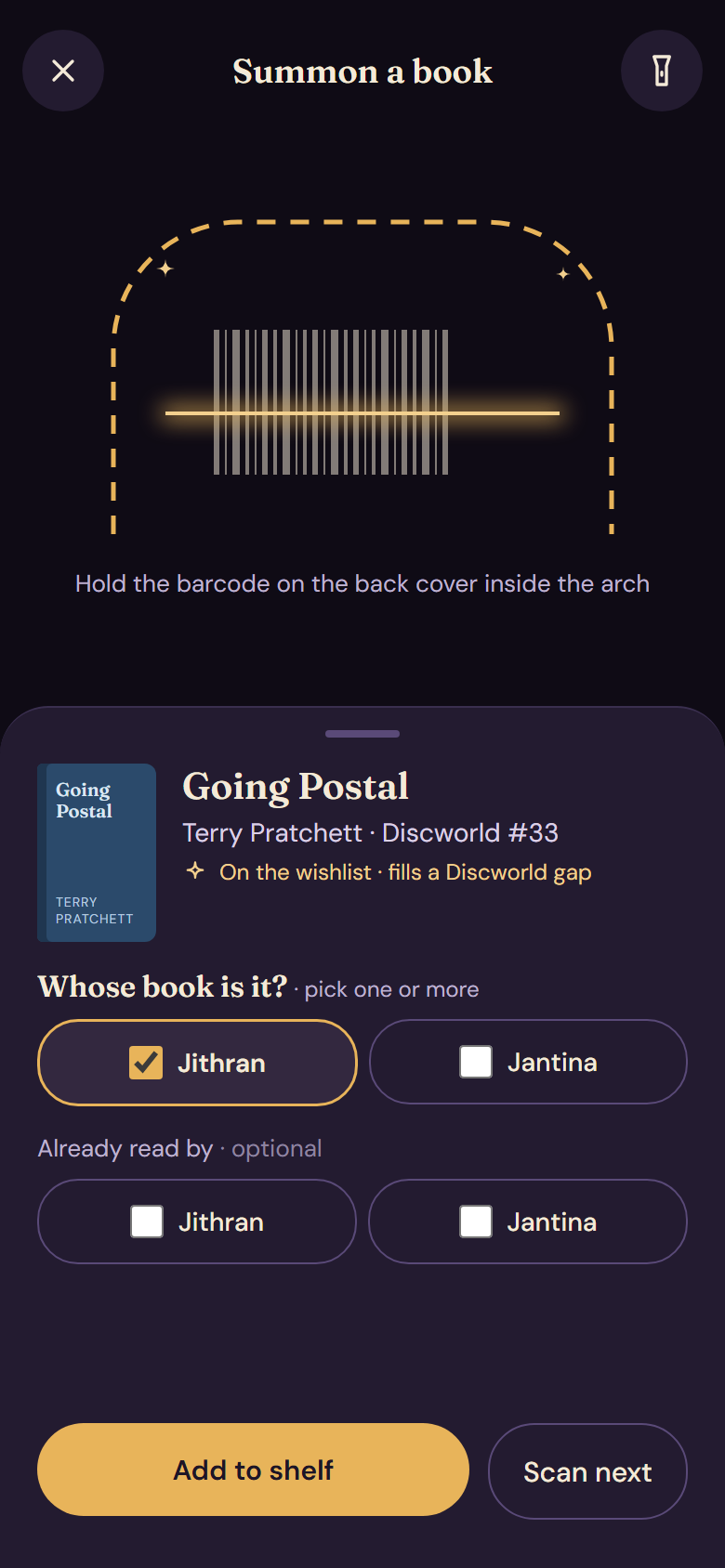
The scan screen: a barcode inside an arch, and a sheet asking whose book it is.

Scanning

Scan it, and say whose it is

Hold the barcode inside the arch. Spinebound finds the book, and you pick the owner or owners of this copy.

  • Already own it? Spinebound tells you before you buy it twice.
  • Missing covers are generated, never left blank.

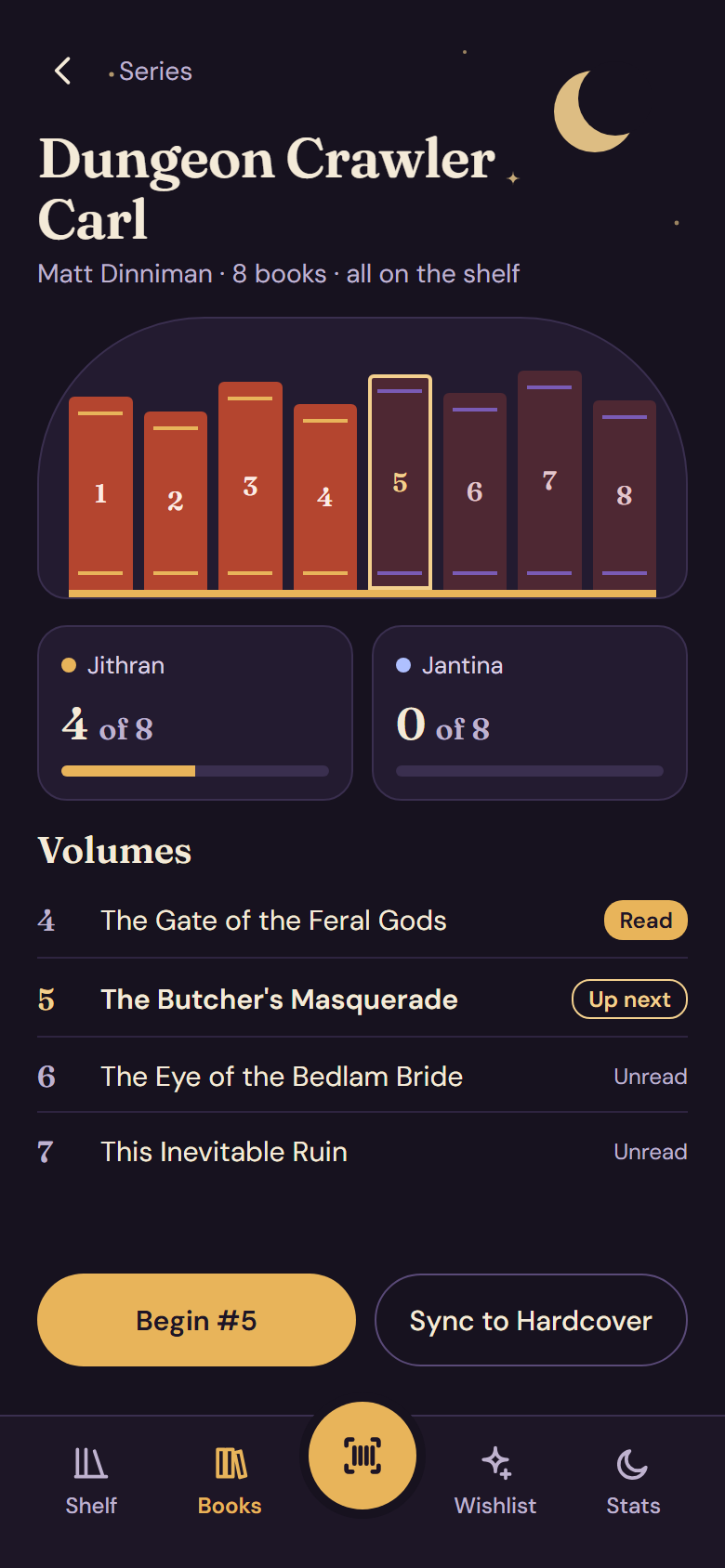
A series page showing eight volumes on a shelf, with read and unread counts per reader.

Series

See what is read, unread and missing

Every series stands on its own shelf line. Gaps show up with their real titles, so you know what to look for next.

  • Progress per reader: 4 of 8 for one, 0 of 8 for the other.
  • Next up is one tap away.

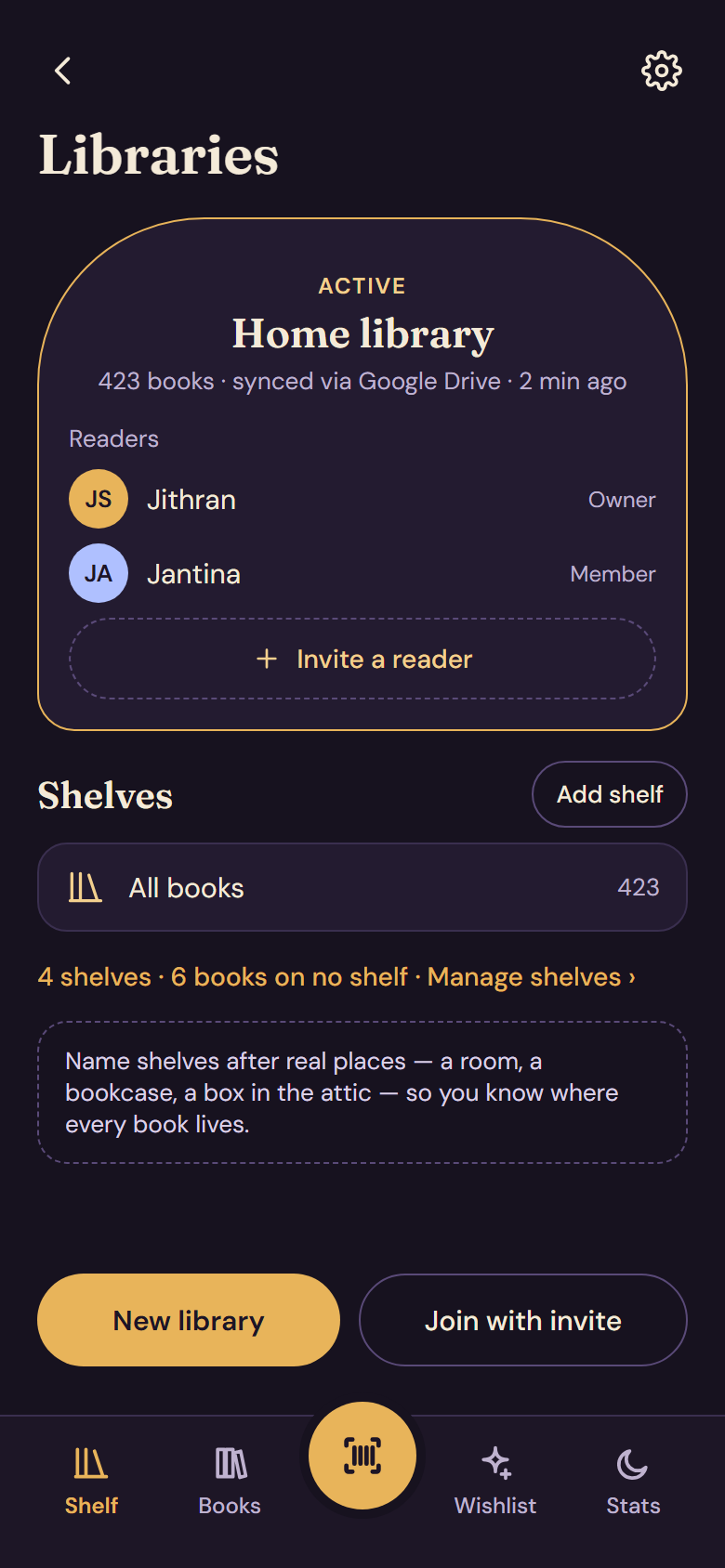
A library page listing two readers, an invite button and the shelves.

Readers and household

One library, every reader

Each copy has its owners, and each reader keeps their own status and rating. Invite someone from your household, and you share the shelf without sharing an account.

  • Owned by Jantina · Jithran is reading.
  • Lend a copy and see who has it.

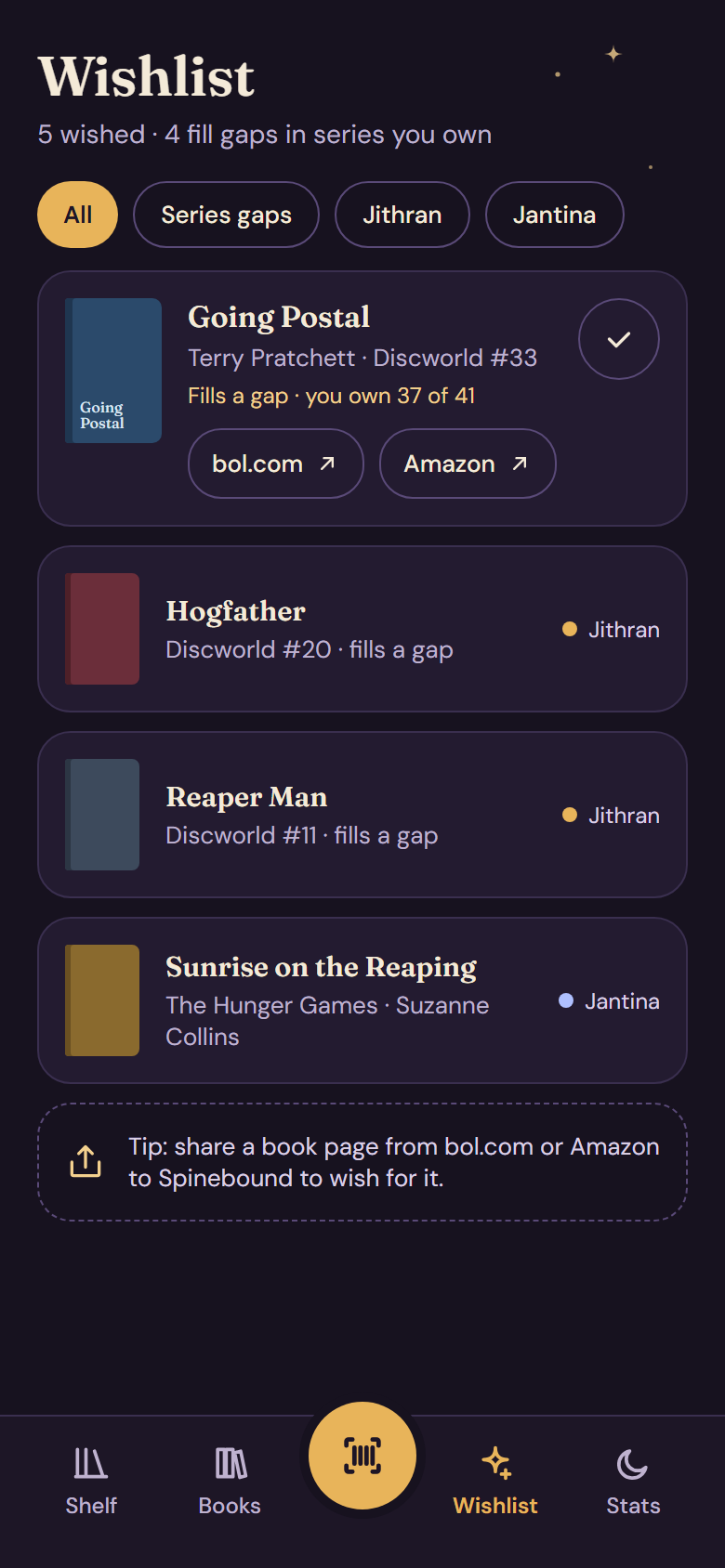
The wishlist, with books that fill gaps in series you own.

Wishlist

Wish for the book that fills the gap

Wish for a book, and Spinebound flags the ones that complete a series you already own. Look it up at bol.com or Amazon when you are ready.

  • Share a book from a shop straight to your wishlist.
  • Tick it off when it joins the shelf.

Privacy

Your shelf stays yours

No server of ours

There is no Spinebound account and nothing in between. We do not see your books, your ratings or who you are.

Data on your phones

Your library lives on each reader’s own phone, so it keeps working when you are offline.

Sync through your Drive

Phones sync through your own Google Drive. You choose the folder and you can stop at any time.

To find a title and a cover, Spinebound sends a book’s ISBN to Google Books, Open Library and, if you connect it, Hardcover. Nothing else leaves your phone.